Enquiry routing
A web form or shared inbox receives a request. The workflow classifies it, prepares a draft reply, waits for a person to approve, then updates the CRM. Needs: form or mailbox access, CRM access, routing rules.
AI Automation & Agents
REIT Limited, a Bangladesh-based AI services and technical-delivery company, maps one repeated process and builds it as a tested workflow that your team can run, inspect and correct.
What it is
AI workflow automation is a defined sequence of business steps that runs from a known trigger to an agreed result, using AI only at the steps where it adds value. Approvals, exception handling and logs are written into the process, so a person stops the work whenever the next action is uncertain, costly or customer-facing.
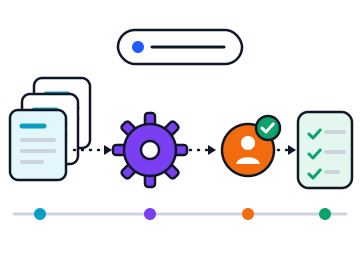
It removes the hand work from a process that repeats: reading requests, copying details between systems, chasing approvals and sending updates. The trigger, rules, approval points and result are fixed in advance and recorded on every run.
Many teams repeat the same steps by hand: reading an incoming request, copying details between systems, waiting for an approval, sending a notification. The work is predictable, but it depends on people remembering every step. Requests wait in inboxes, records drift out of date, and nobody can say where a particular case stopped.
A workflow fixes the path. The trigger, the rules, the approval points and the result are agreed in advance and recorded each time the process runs.
Four situations where this service fits, with what each needs from you.
A web form or shared inbox receives a request. The workflow classifies it, prepares a draft reply, waits for a person to approve, then updates the CRM. Needs: form or mailbox access, CRM access, routing rules.
Incoming forms or supplier documents are read, key fields are extracted and checked against rules, and anything that fails a rule goes to a named reviewer. Needs: sample documents and the validation rules.
Access, equipment or change requests are routed to the right owner with reminders and a record of each decision. Needs: the request categories and who approves each one.
When a record changes state, the workflow prepares the customer message and sends it once the agreed approval is given. Needs: the states, the message templates and the approver.
A designed, built, tested and documented engagement with written acceptance checks, an operating guide and a handover. This section lists what is included, what is optional, what is excluded and what stays with you.
| Capability | What it covers | Typical tools and connections |
|---|---|---|
| Process mapping | Current steps, owners, inputs, exceptions and the automation opportunities among them | Workshops, process map, exception list |
| Workflow build | Triggers, rules, AI steps, approval gates and exception handling | n8n, Make, Zapier or direct API connections |
| Document intake | Reading forms and attachments, extracting fields, checking them against rules | Mailboxes, document stores, extraction models |
| Approval queues | Queues for replies, record updates and data changes that a named person must approve | Helpdesk, CRM tasks, chat approvals |
| Low-confidence routing | Items the AI step is unsure about go to an expert reviewer instead of continuing | Confidence thresholds, review queue |
| Audit record | The AI output, the person's edits, the approval and the final action are stored for each run | Execution log, database, spreadsheet export |
| Monitoring after launch | Failed and stalled runs are alerted, reviewed and used to improve the workflow | Alerts, run dashboard, monthly review |
A connection is confirmed in the assessment, after checking the interface, permissions and vendor limits of each system.
The stages are colour-coded the same way across this website: input, processing, human approval, outcome.
One engagement, with the measures agreed before the pilot and reported after launch.
Case studySample case study
Brindlemoor Supply Co. · Wholesale distribution, United Kingdom
Purchase orders arrived as PDF attachments in a shared mailbox. Two coordinators retyped each order into the ERP, and urgent orders waited behind routine ones.
A coordinator approves every draft order before it reaches the ERP; low-confidence extractions are flagged line by line.
Median time from email to ERP entry fell from 46 hours to 3 hours, and keying errors found at picking fell by four fifths. The coordinators now handle exceptions and supplier calls.
Handwritten amendments on scanned orders still need manual entry; they are about 6% of volume and are routed straight to a person.
| Period | Value |
|---|---|
| Jan | 48 |
| Feb | 46 |
| Mar | 44 |
| Apr | 9 |
| May | 4 |
| Jun | 3 |
Figures from named surveys and official statistics, each with its source.
25%
of respondents have moved 40% or more of their AI pilots into production.
Deloitte, 21 January 2026Survey of 3,235 leaders in 24 countries, August to September 2025
Nearly 3 in 4
AI high performers report fundamentally redesigning workflows because of their AI use, compared with one quarter of other respondents.
McKinsey & Company, 25 August 2026Survey of 1,719 respondents, May to June 2026; high performers are about 6% of respondents
63%
of organisations either do not have, or are unsure whether they have, the right data management practices for AI.
Gartner, 26 February 2025Survey of 1,203 data management leaders, July 2024
Through acceptance checks agreed before the build, named approvers for sensitive actions, access limited to what you grant, monitoring with alerts, written recovery steps and a named owner after handover.
Work starts with a paid AI assessment of one process (USD 500, usually 5 working days). A scoped pilot follows (from USD 2,500), then implementation and support, each priced in a written proposal.
USD 500
5 working days
One process reviewed for fit, dependencies and risk.
from USD 2,500
3 to 4 weeks
One bounded use case built and tested on real cases.
from USD 6,000
6 to 10 weeks
The accepted pilot hardened, connected and launched.
Sample pricesPrices exclude third-party licences, model usage and taxes. The proposal sets the final price for your scope. Invoices are issued in USD; GBP, EUR and AUD are available on request.
The first step is an AI assessment of one process or one bounded task. It establishes whether the work is a sound candidate, what it depends on, and what a pilot would cover. An enquiry is a request for that conversation; it is not an appointment or an order.
Build work is quoted in the proposal that follows the assessment. Third-party licences, model usage and hosting are recurring costs and are shown separately from implementation. Ongoing support is a separate arrangement with its own scope. See How We Work for how the stages differ.
AI workflow automation runs a defined sequence of steps from a known trigger to an agreed result, with AI used at specific steps such as classifying a request or drafting a reply. It suits tasks that repeat often, follow rules that can be written down, have stable inputs, and have a clear owner who can say when the result is correct.
A task is a poor fit when its steps change every time, when nobody owns the process, when the inputs are unreliable, or when the systems involved offer no way to connect. A simple problem already solved by a feature in software you own is also a poor fit. In those cases the assessment recommends preparation work or a smaller change.
A person approves any action that is uncertain, costly or customer-facing: sending a message to a customer, changing an important record, or committing spend. These approval points are agreed during design and written into the workflow, so the automation prepares the work and waits. Routine internal steps, such as sorting and logging, run without a stop.
Tell us the process or task you want to improve, the systems it touches and the result you need.